Built for broadcast · iOS & Android
CyanCamera App.
A broadcast camera in your pocket.
Your phone becomes a numbered camera on your CyanView gateway, shaded live from the same CyanView RCP your team already uses on every other camera in the show.
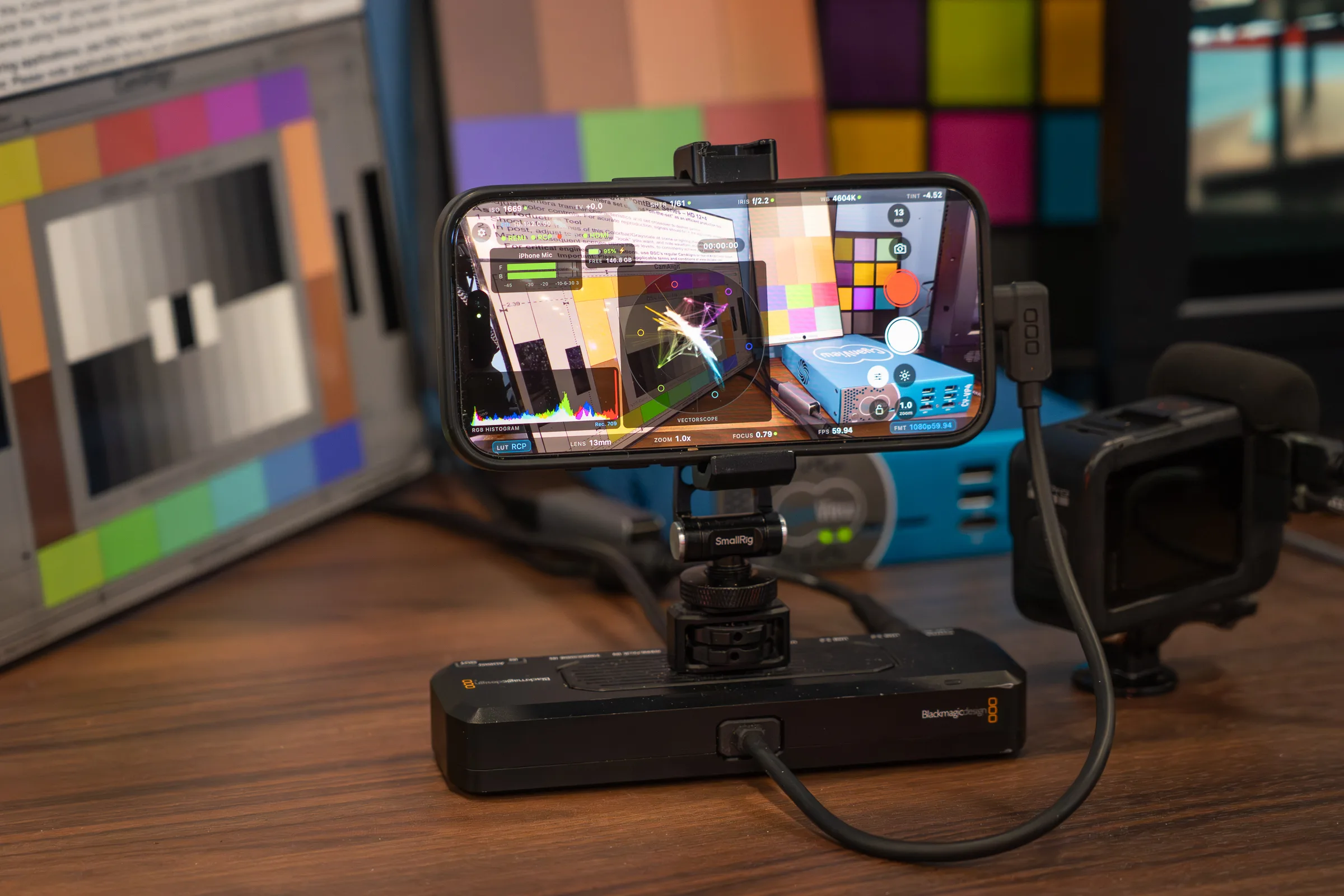
CyanCamera is driven by a CyanView RCP - the panel your shader already uses.
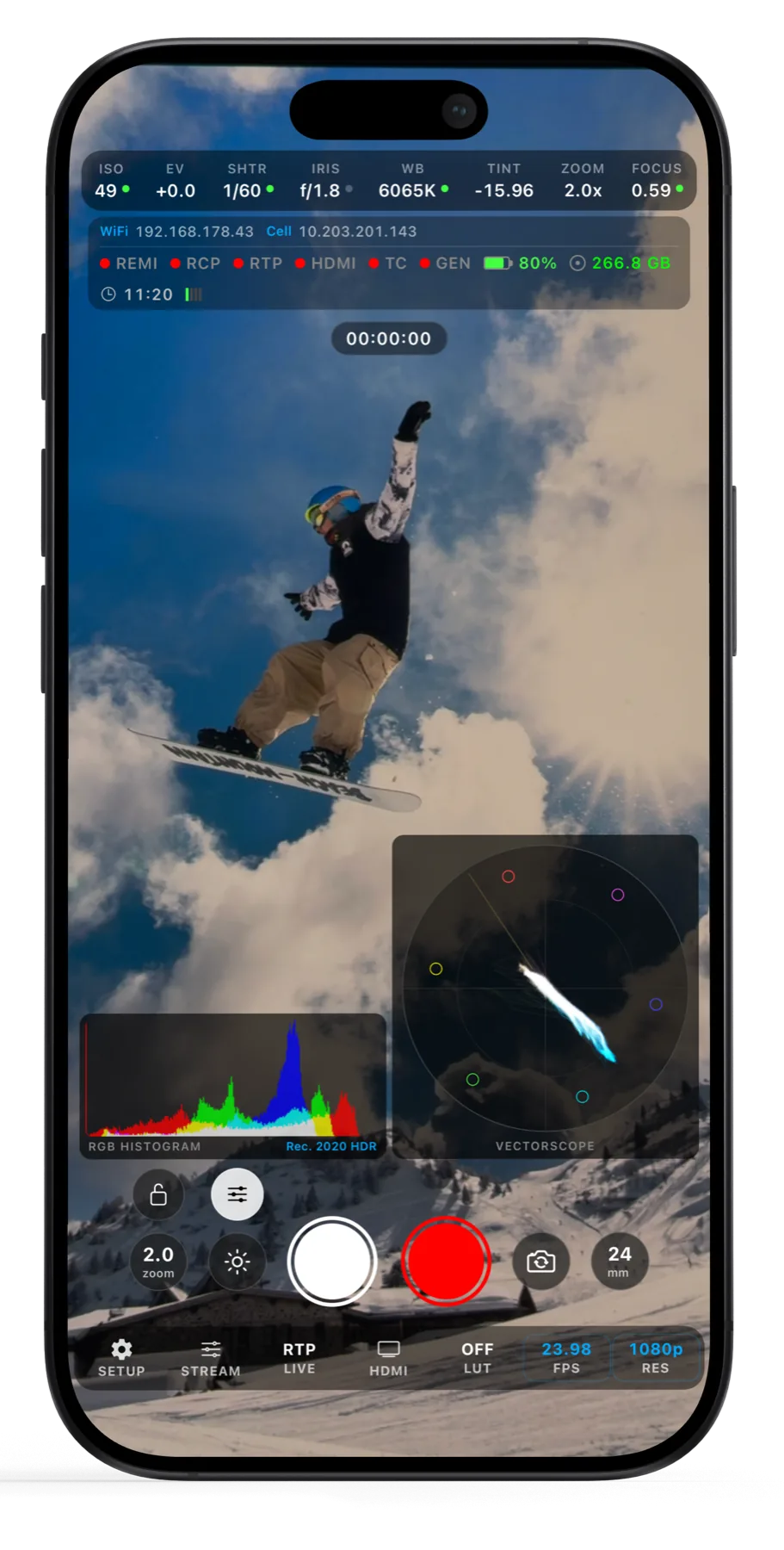
The App
It shows up on the gateway like any other camera.
Once it is on the gateway, your shader drives CyanCamera from the RCP the same way as the 210+ camera models CyanView already controls. Nothing new to learn at the desk.
Capabilities
What the phone does.
Pro camera capture
- › HEVC 8 or 10-bit, ProRes 422 Proxy to HQ, Apple ProRes RAW on supported iPhones
- › Rec.709, P3 D65, Rec.2020 HLG, Apple Log and Log 2, with Log and HLG at 10 bits end to end
- › 23.98 to 60 fps in 1080p and 4K, plus 120 and 240 fps, sensor clock pinned to the exact fractional cadence
- › Automatic or fixed bit rate up to 240 Mbps, to the photo library, an SSD or any Files folder
- › Stills, stabilization modes, frame guides, shutter angle display and a thermal monitor that sheds load before iOS throttles
CyanView RCP control
- › ISO, shutter, iris, exposure compensation, white balance, focus and zoom from the RCP over REMI, with fine clicks and configurable knob steps
- › Custom buttons switch lenses, toggle the look, flip the camera, start recording, switch RTP and SRT, nudge the bit rate and toggle HDMI
- › Red, green and call tally light a border around the picture; the RCP sees battery, thermal state, HDMI, codec and free space
- › Auto exposure can be fenced inside an operator-set ISO and shutter window; iris priority on variable aperture lenses (iOS 27)
- › REMI Cloud connects the phone to an RCP over the internet with regional servers and a latency probe
- › VISCA over IP, Blackmagic zoom and focus demand over USB MIDI, and a REST settings API for scripted setup
On-device color shading
- › Lift, gamma, gain, saturation, hue and local contrast, live from the panel
- › 16-vector multimatrix with gate & select
- › Bakes into a 3D LUT scoped per consumer: preview, HDMI, recording or stream
- › Lockable so operators can't switch it off
16-vector multimatrix - real-time on-device processing
Streaming Protocols
Local network, video only
Public internet, encrypted
RTP & SRT streaming
- › RTP on the local network, a few frames glass to glass, with a lossless path and a control channel into FXVP
- › SRT over the public internet in caller or listener mode, encrypted, with AAC audio and NTP timecode SEI for Makito MultiSync
- › H.264 or H.265, bit rate changed live from the phone or the RCP
- › 1080p240 to FXVP for slow motion & instant replay
HDMI output stream
- › Rec.709, HLG or Apple Log 2 at up to 10 bits through a USB-C adapter
- › Preview and Output modes bake the look on the GPU
- › Broadcast mode (iOS 27) sends the sensor feed straight to the link at exact cadence with SMPTE ancillary metadata
- › Audio monitoring and anamorphic de-squeeze on the monitor
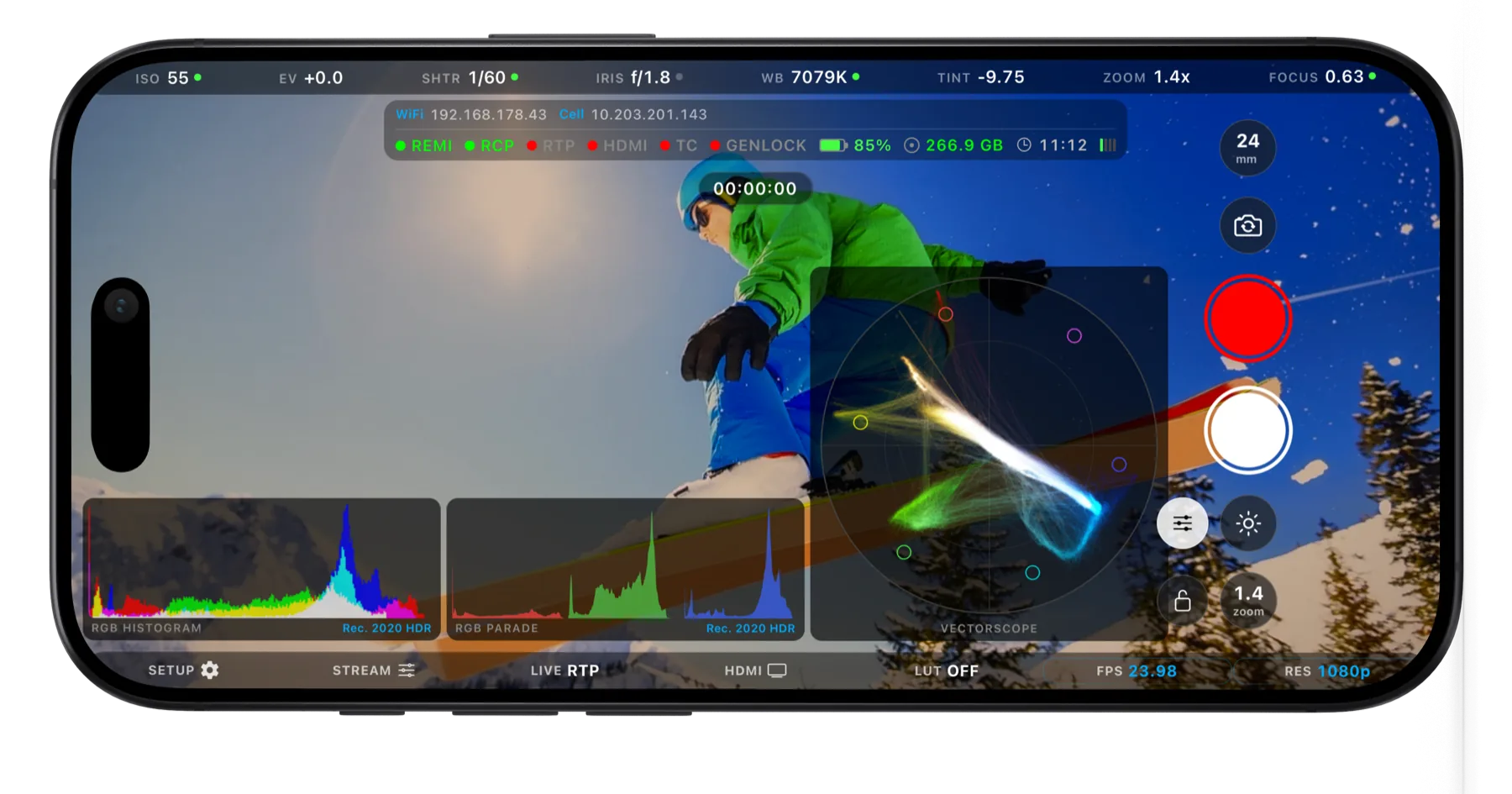
Waveform & vectorscope
- › RGB parade & RGB histogram for exposure and balance
- › Vectorscope for hue and saturation
- › Configurable refresh rate, plus an audio meter
- › Runs entirely on the GPU, no external hardware
RGB Parade
Vectorscope
CyanView Studio
CyanCamera
Desktop Processing Pipeline
LiveLab LUT import
- › Load any .cube as your base look, from CyanView Studio or any grading suite
- › Apple Log to Rec.709 conversions ship in the app
- › CyanView LiveLab pushes LUTs live over the network and grabs frames for grading
- › Chains underneath the live on-device grade
Genlock & timecode
- › Genlock and LTC on BNC through the Blackmagic Camera ProDock lock the phone to house sync
- › Recordings carry a timecode track with offset trim, so the feed cuts frame-accurately
- › Timecode can also come from MIDI timecode over the network or from NTP
- › No genlock? A PoE dongle adds wired networking
iPhone 17 Pro+ for genlock · any ProDock model for timecode
Use Cases
Where it fits.
Impossible angles
Extra angles a full-size camera cannot reach.
Remote contributors
Contributors working on location, shaded from the truck.
Second unit & BTS
Behind-the-scenes coverage that still cuts cleanly against the main cameras.
Low-cost expansion
Grow a multi-camera setup without adding another rack.
Availability
Available on iOS and Android.
Remote control and shading need a CyanView RCP. Everything else runs standalone. Genlock and LTC need a Blackmagic Camera ProDock. Apple Log 2 needs iOS 26. Broadcast HDMI output and iris control need iOS 27. ProRes and ProRes RAW need a supported iPhone.
With CyanView Studio
The shading desk
behind the camera.
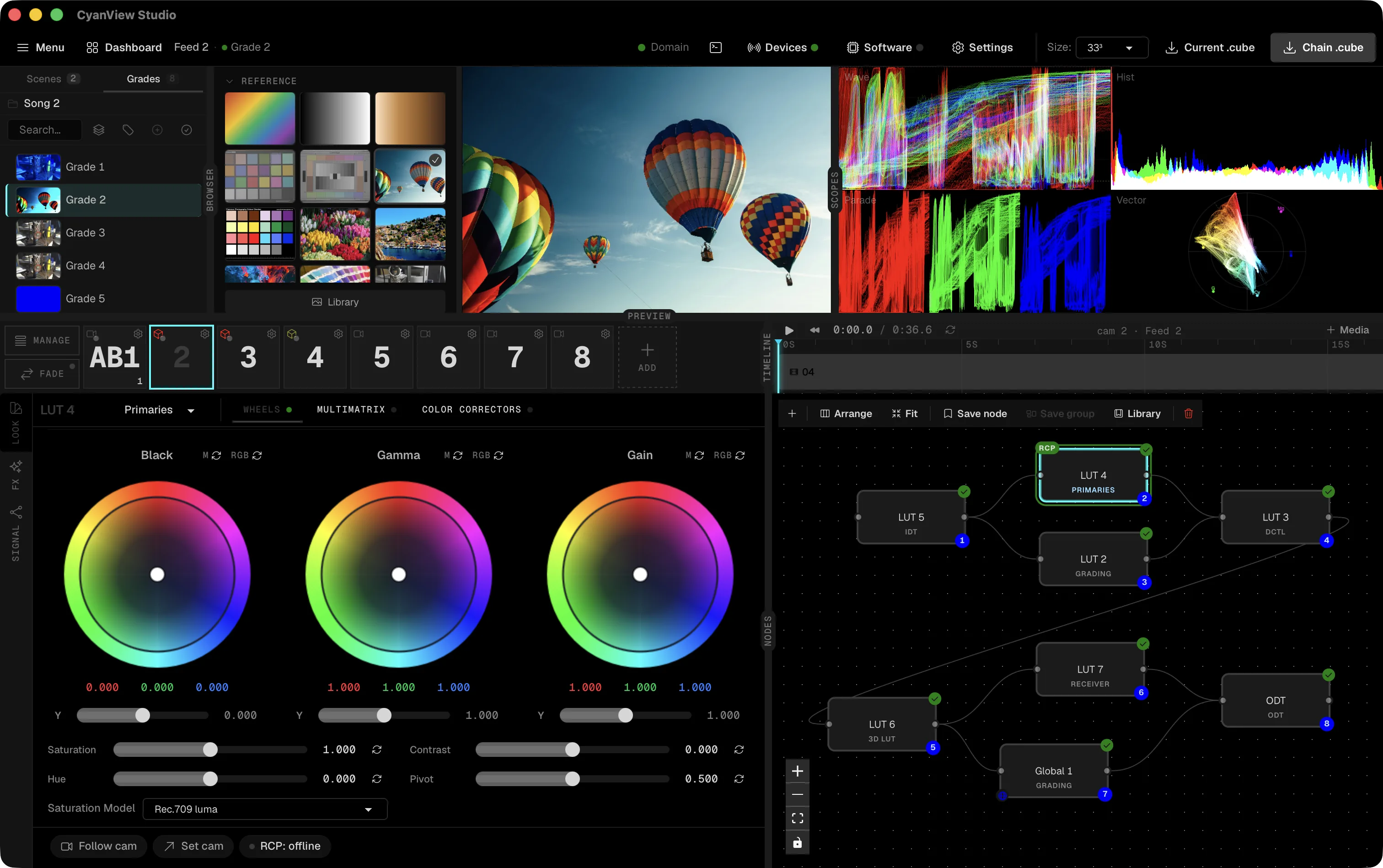
CyanView Studio runs on your Mac or PC and controls CyanCamera alongside 210+ broadcast and cine camera models. Grade live, push a 3D LUT to the phone and grab frames for the post team.
- Camera dashboard for RCPs, RIOs and CyanCamera phones
- Primaries, curves, CDL and colour warper with built-in scopes
- Live LUT push to CyanCamera, AJA, VP4 and BoxIO
Developers
Build with CyanView
CyanCamera isn't the only app that speaks our protocol. Mavis and other third party camera apps already take control from the CyanView RCP. If you build a camera or video app, one integration puts it on the panel too.
Sign Up to DevelopComing Soon
Get the app.
Your phone on the panel, next to every other camera in the show.